Getting your data out of MassageBook
Your client list, your appointment history, the gift certificates and store credits you still owe. Where every export button is, the date ranges most therapists get wrong, and the one thing MassageBook will not hand back in bulk.
The short version
- Clients live behind one button. Clients, then Import / Export in the top right, then Export client file. You get a CSV.
- Everything else lives in Sales. Each report on the left rail exports on its own. Run them all, not just the one you came for.
- Fix the date ranges. Reports open on a narrow default window. Push the start back to the day you opened, and push Future Appointments forward at least twelve months.
- SOAP notes and intake forms do not bulk export. They come out one at a time as PDFs. Start that before you cancel, not after.
- Export while the account is still open. Once billing lapses, the buttons go with it.
Nobody leaves a platform on a calm Tuesday with a free afternoon. It happens in a rush, usually after something goes wrong, and the export is the part that gets skipped. So do this part first, before you decide anything. An hour of exporting buys you the freedom to leave whenever you like, and it costs you nothing if you stay.
One thing to know before you start: only the profile listed as the business owner can export the client list. If you have a second login for a front desk helper or a contractor, sign out and sign back in as the owner, or the button will not be there.
1. The client list
This is the one that matters most, and it is the easiest. Go to Clients. The Import / Export menu sits in the top right corner. Open it and choose Export client file, and a CSV downloads to your device. If you only want part of the list, filter the list on screen first and the export follows the filter.
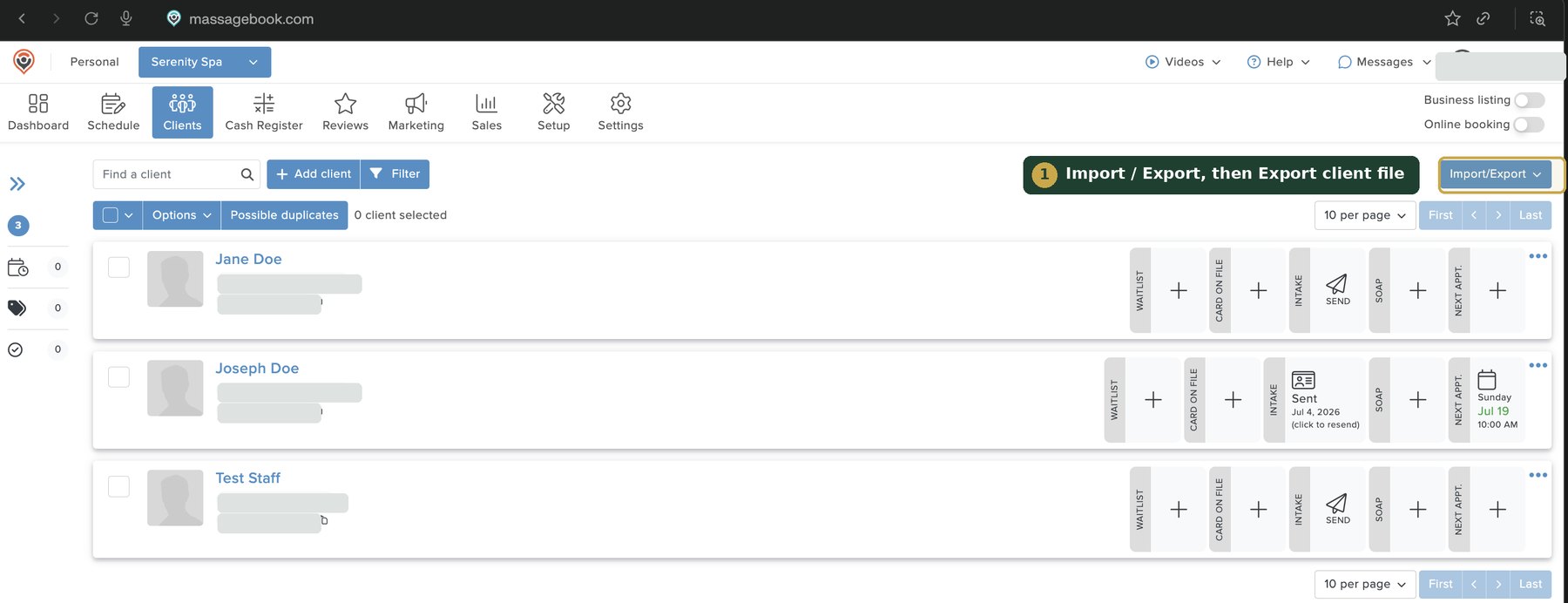
Open the file once it lands. If names and emails are in it, you have what you need. That single CSV is the thing your practice is actually built on, and it is the file MyBodyMap imports directly.
2. Appointments, money, and everything you owe
The rest of your history is under Sales, in the reports rail down the left side. Each one is a separate report with its own date range, its own Export button, and its own CSV. There is no single button that gives you all of it, so treat the rail as a checklist and work down it.
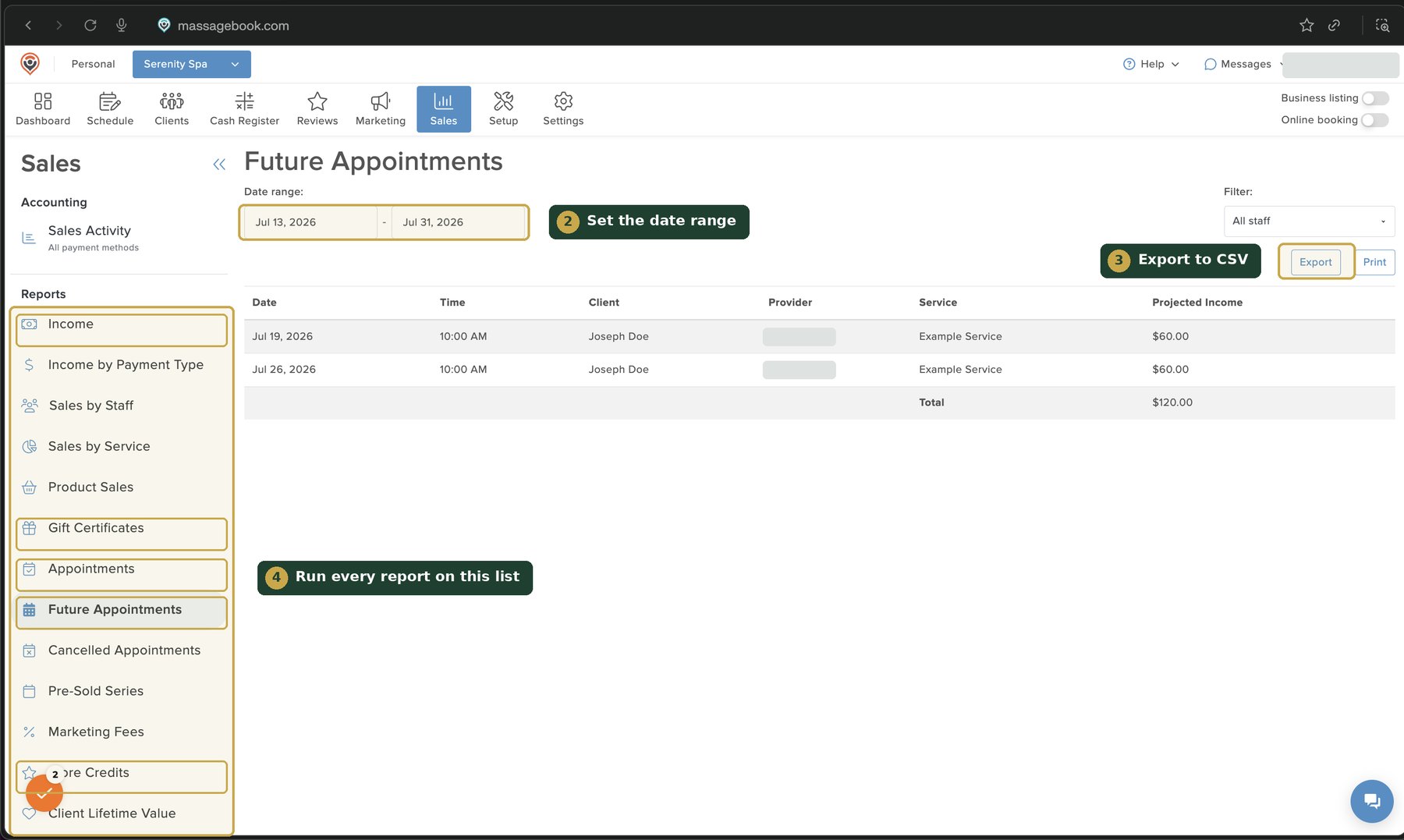
Run every one of these
- Appointments
- Future Appointments
- Gift Certificates
- Store Credits
- Income
- Income by Payment Type
- Sales by Staff
- Sales by Service
- Product Sales
- Cancelled Appointments
- Pre-Sold Series
- Marketing Fees
- Client Lifetime Value
Export is a CSV. Print gives you a PDF if you would rather have something you can read without a spreadsheet. Take both on the money reports; your accountant will ask for one of them eventually.
3. The date ranges people get wrong
Every report opens on a default window, and the default is short. That is how a therapist ends up with an export that looks complete and is missing four years.
For anything historical, set the start date to the day you opened the practice, or earlier. For Future Appointments, the default window is only the next couple of weeks. Push the end date out at least twelve months, further if you take standing weekly bookings or you sold a package that runs into next year. Anything past that end date is simply not in the file, and a client whose next visit is fourteen months out will silently vanish.
That is the one to be careful with. Somebody handed over cash last winter for a gift certificate that has not been redeemed. Somebody else has a store credit from a session you had to cancel. If those two reports do not come with you, the balance is gone, and the person who finds out is the client standing in your room expecting a free session. Export them, and keep them somewhere you will look.
4. What does not come out
SOAP notes and intake forms are one at a time
MassageBook has no bulk export for clinical notes. The supported route is to open a client, open the note, choose Print, and save it as a PDF, either with the anatomical image or as text only. Intake forms work the same way.
For a busy practice that is a real afternoon of work, so be honest about which clients you need history for. Active clients from the last two years, anyone with a complex or ongoing issue, and anyone you have ever had a difficult conversation with. Save the PDFs in one folder, named by client.
Your notes are also a records-retention obligation in most states, usually somewhere between four and seven years. Losing access to the platform does not end that obligation, which is the real reason to do this before you cancel rather than after.
Your appointment history is not a gap, as long as you export it. MyBodyMap reads the Appointments and Future Appointments reports and rebuilds each client's visit history from them, with your upcoming bookings landing on your calendar. Keep the CSVs as your own record too.
5. Then bring it over
In MyBodyMap, go to Settings, then Bring your practice to MyBodyMap, and drop in every file you exported at once: your client list, Appointments, Future Appointments, Gift Certificates, Store Credits and Pre-Sold Series. It works out which file is which, and you see everything that will come over before anything is saved. If you only have your client list today, Clients, then Import still works, and you can add your appointments later without anything doubling up. Nothing is emailed to your clients when they land. Your list is your list, and it stays quiet until you decide to say something.
You do not have to switch on the day you export, either. Plenty of therapists sit on the files for a month while they try a new platform alongside the old one. The export is not the decision. It is what makes the decision yours.